
The problem: You want people to easily remember your Facebook Group URL and share it.
The solution: Use the Edit Group selection to set the vanity URL to something memorable.
So you’re building your brand via Facebook and not only do you have a Facebook page, you also have a Facebook group as well!
You know how you can set up the Facebook Page URL over at facebook.com/username … but did you also know you can achieve this with Facebook Groups?
Here’s how.
How to do this.
Step 1.) Visit your group and click the Gear and then “Edit Group Settings.”

Step 2.) Type in your group name and save.
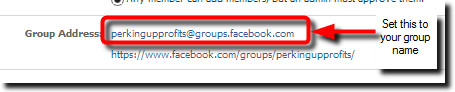
And that’s all that’s required to set your Facebook Group URL.
It’s amazing how many popular FB groups STILL have not claimed their vanity URL. The above simply reinforces your brand name when your fans visit your group and make it unforgettable like:
- facebook.com/groups/perkingupprofits
- www.facebook.com/groups/theiminsidetrack/
- www.facebook.com/groups/marketingmorsels/
Enjoy!
Grow strong,
Barbara Ling


 Get Started Here
 You’ll love what you learn… Promise!