
Good morning gentle reader!
Let me ask you a delightful question.
What do *you*….think about…
HELL?
No, I'm not talking about:
Nor even
Although I will admit, the following is quite a clever comeback:
Ahem. Methinks I just digressed. 🙂
No indeed, when I personally think about Hell, I think about parents who showcase such a mind-numbing level of selfishness and stubborness that the Green Hornet would dive for the RAID first.
'course, that has nothing to do with today's blog post topic at all!
Except it *did* give me a dandy excuse to include the above videos. 🙂
Anywhos!
The topic of this week is the joy known as affiliate marketing. And today is time for Tip #3!
Drumroll please!
Ever want a quick easy way to add niche targeted Clickbank products to your sidebar?
I must credit Bill Vick over at 40 Plus Fitness for reminding me of this goodness!
G'head, click on his link (40 Plus Fitness) and lookie quick-like at the sidebar.
You'll see, under Our Supporters, the following:
| Killer Weight Loss Pack No Weight Loss ?Secrets? Here. Just Weight Loss Answers. Only $4.95 |
| Lose Weight Feel Good Learn Weight Loss Secrets Boost Self Esteem |
| How to Lose Weight with Yoga Detailed guide on Yoga, losing weight, diet, breathing & relaxation |
| Paleo Cookbooks Complete Recipe Guide To Healthy Eating for Weight Loss |
And if you click on any of those links, you'll see they go to the targeted affiliate product, along with Bill's clickbank affiliate ID.
Ain't that grand?
And wouldn't you just love to be able to do that yourself?
'course you would!
And here's how.
 Step 1.) Know thy Clickbank ID.
You choose one when you sign up for Clickbank.
Need one? Grab it here! It's free.
Step 2.) Visit the Hopfeed page.
Zee page, it be:
www.clickbank.com/account/hopAdBuilder.htm
Here you can choose a Text Ads Builder or a Tab Box Builder.
Choose Text Ads Builder.
Step 3.) Fill out the keywords you'd like to use.
Here's my screen after I added "social marketing" as the keyword., and also "blogSM: for my tracking ID.
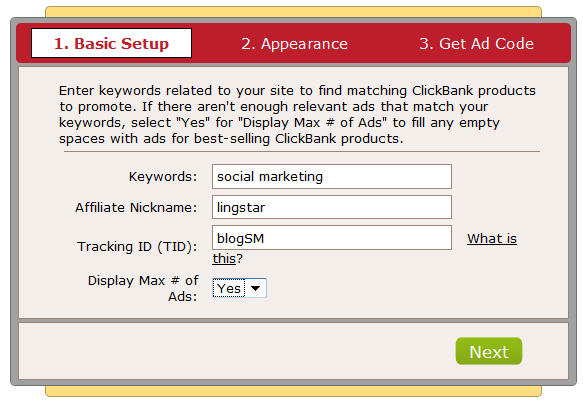
Then:
Step 4.) Click NEXT and get to Appearance.
You'll see the following exciting goodness:
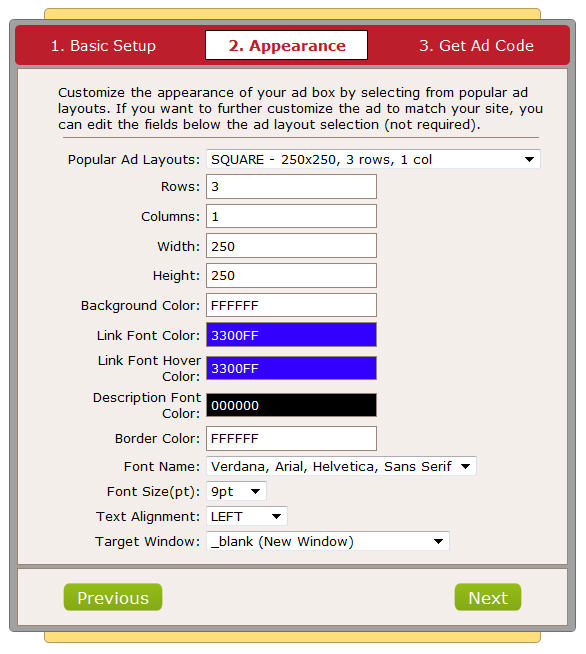
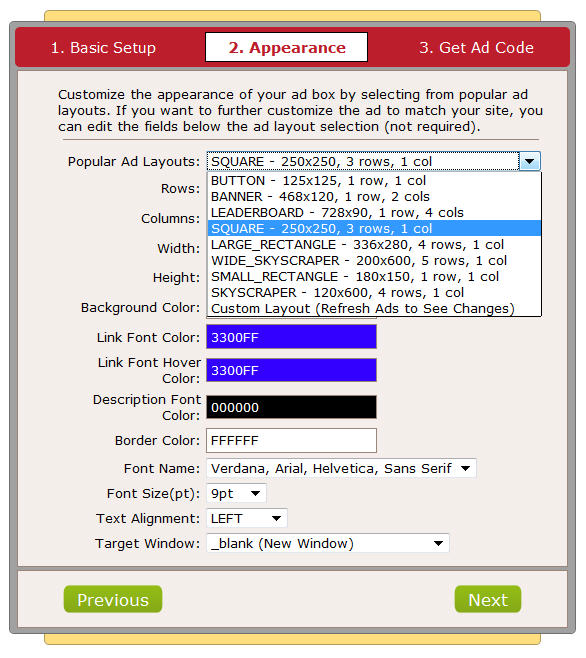
See that first dropdown?
Click on it – you can use any nifty neato popular ad configuration you'd like, including making your own custom size!
Here's an example of me changing the link colors and also setting the number of products (in this case, "rows"), returned.
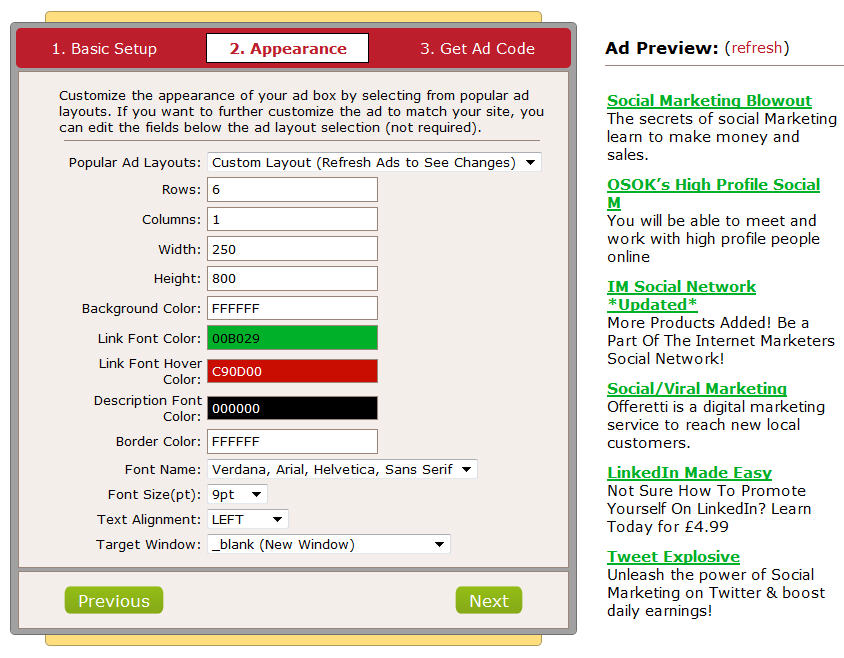
Notice the "refresh link" on the right at the top of the ads!
This allows you see just how your ads are going to look and feel.
Once you're thrilled down to your not-frost-bitten toes (which I currently have), click on Next and:
Step 5.) Get your code for your text sidebar widget.
You'll be presented with something like:
<script type="text/javascript">
    hopfeed_template='';
    hopfeed_align='LEFT';
    hopfeed_type='IFRAME';
    hopfeed_affiliate_tid='blogSM';
    hopfeed_affiliate='lingstar';
    hopfeed_fill_slots='true';
    hopfeed_height='800';
    hopfeed_width='250';
    hopfeed_cellpadding='5';
    hopfeed_rows='6';
    hopfeed_cols='1';
    hopfeed_font='Verdana, Arial, Helvetica, Sans Serif';
    hopfeed_font_size='9pt';
    hopfeed_font_color='000000';
    hopfeed_border_color='FFFFFF';
    hopfeed_link_font_color='00B029';
    hopfeed_link_font_hover_color='C90D00';
    hopfeed_background_color='FFFFFF';
    hopfeed_keywords='social marketing';
    hopfeed_path='http://lingstar.hopfeed.com';
    hopfeed_link_target='_blank';
</script>
<script type="text/javascript"
src='http://lingstar.hopfeed.com/script/hopfeed.js'>
</script>
Finally:
Step 6.) Paste that Clickbank Hopfeed code into a text box widget on your sidebar.
And once you do, you'll see something like:
Except, of course, it would be in your sidebar.
Neat, eh? And remember:
Once you have this code pasted into your text widget on your sidebar, you're home free – you don't have to tweak the product offerings again! Clickbank does that for you.
If that's not easy, I don't know what is!
Oh, and if you need help for adding text widgets to your sidebar, this quick video shows it nicely!
Hope you find it useful! Do you have any easy nifty ways of including affiliate links in your sidebar?
I'd love to read about them below!
Grow strong,
Barbara Ling
ps – want to get the inside scoop about Affiliate Marketing? Check out my product, Fast Track Affiliate Marketing Power…you won't look back!



 Get Started Here
 You’ll love what you learn… Promise!